
http://www.sulinkco.com Phone: 763.390.5988
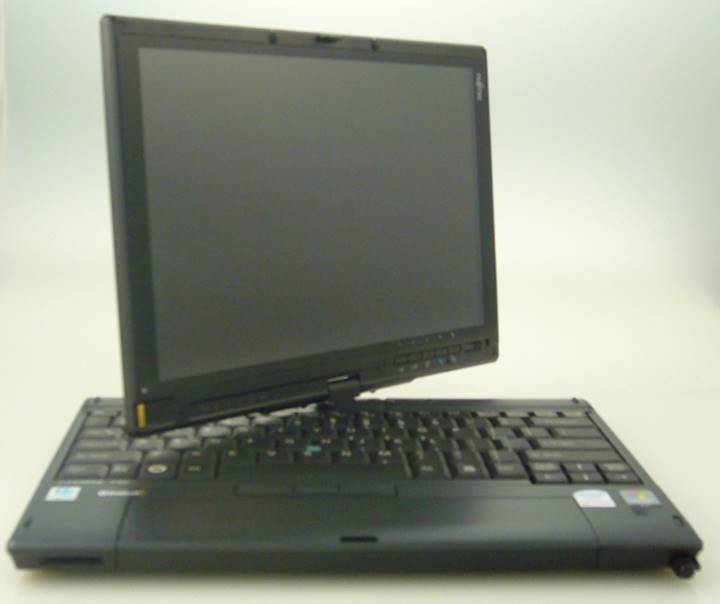
Welcome to FUJITSU LifeBook T2020, with Intel Core
2 Duo U9300 1.6GHz Intel GS45 chipset.
Sale
price $190 w/full attachments
The
Fujitsu LifeBook T2020 Tablet PC specs:
- 150GB
(5400 rpm) hard drive, SSD optional
- 4 GB
DDR3-800Mhz SDRAM
- Windows
7 Home Premium
- 12.1"
WXGA indoor/outdoor active digitizer display with wide viewing angles
(1280x800)
- Integrated
speakers
- 2 x USB
- 1 x VGA
- 15 pin
- 1 x
IEEE 1394 (Firewire)
- 1 x Type I/II PCMCIA slot
- 1 x
Smart Card slot
- 1 x
Media card reader
- 1 x
Microphone-in and 1 x Headphone
- Atheros
XSPAN (802.11a/b/g/n)
- RJ-45
and RJ-11
- 10/100/1000
Ethernet
- Bluetooth
2.0
- High-capacity
6-cell Lithium-Ion battery (showing 7 hours load to last)
- Weight:
3.8lbs.
- Dimensions:
11.9" (Width) x 8.8" (Depth) x 1.36" (Thick)
Yours for $190 (including full attachment of tablet satin
wallet, full carrying bag, docking station, stationary and mobile power
chargers, set of setup disks (Windows Vista), printed Manual, wireless laptop
Logitech mouse)
Design and Build
The T2020 has a simple design that is
sleek and appealing. It has that business feel to it, compact and lightweight,
at 3.8lbs. It would be perfect for college students as well considering how
small it is and the active digitizer is great for note-taking. The graphite
color hides dirt very well and keeps the tablet looking professional. The
chassis is solid and there is minimal flex, except for the keyboard area, which
I will get to later.
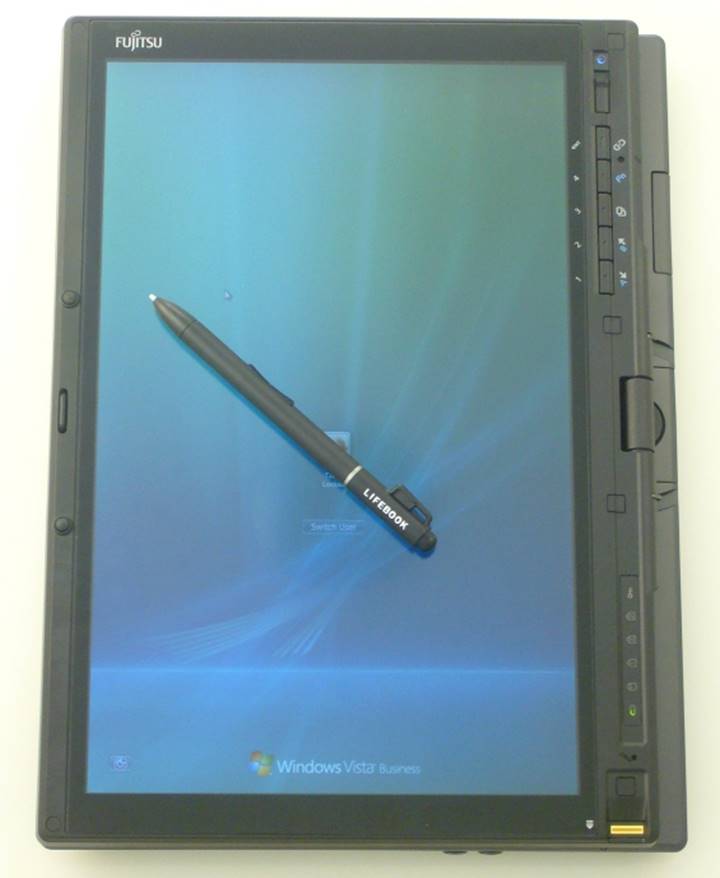
There are a few dedicated tablet buttons on the bottom
of the screen that change the screen orientation and function. They are very
convenient, especially when using the T2020 in tablet mode. As I mentioned
before this review is very similar to the T2010 review because none of the
design features have changed.
The hinge is solid and feels sturdy. The
screen doesn't wobble much, even when tapped. It has Fujitsu's signature
bi-directional hinge as well. The entire design is solid and the battery being
located in the front isn't an inconvenience at all. I thought it may be awkward,
but it makes for a nice palm rest.
Although, there is no optical drive, the T2020 is packed with a good variety of
features and you can always get the docking solution for more.
Display
The active digitizer is great and the
12.1" WXGA screen is flawless. You can adjust the brightness level to your
liking and I didn't notice much graininess. The colors are bright and
vivid, so much that I almost forgot I was working with a tablet instead of a
notebook. I didn't have any problems taking notes and since the T2020 has a
bi-directional hinge it's great for presentations. It automatically changes
orientation in tablet mode as well. The screen does have a glossy finish, but
it's not that reflective. In fact it has great viewing angles and is readable
outdoors.
Processor and System Performance
The T2020 I reviewed has a Intel Core 2 Duo U9300 1.6GHz
processor and a 150GB hard drive. It didn't show any signs of lag at all. It
booted-up quickly and had no problems surfing the Web or running the
benchmarks. It did make a little noise when running the benchmarks, so you will
know when this tiny machine is hard at work and there was a little CPU
whine when idling. The T2020 is an improvement from its predecessor, the
T2010. The benchmark scores are improved and the GS45 graphics and processor
are to thank. Remember though, the T2020 isn't for gamers or power friends.
Keyboard/Touchpad/Pen
Don't get me wrong the keyboard has a
nice design, it's just a little too soft and springy for my liking. When you
are typing you can actually see the keys flex. Although, it is very easy to
read since the characters are bolded and plenty big enough and there isn't any
shortened keys. Everything looks small though including the space bar because
Fujitsu didn't compromise any room on this design. Some users may feel a bit
cramped. I wish they would have changed the design a little on the T2020, but
it is the same keyboard as the T2010.
There isn't a touchpad just the pointing
stick, which is very responsive and easy to get adjusted too. I mean there is
barely a palm rest, so where would Fujitsu put a touchpad. Actually the palm
rest is the battery, which connects in the front. The location of the battery
didn't bother me though and it never got hot. This is definitely the perfect
travel companion, nice and compact. I would have liked to see a little more
grip on the pointing stick like Lenovo's because your finger can lose its
place.
The pen feels solid in
your hand and is responsive. It has an eraser too, which is a convenient
feature. It is easy to take notes with because the pen flows nicely on the
screen and doesn't feel awkward in your hand. Fujitsu even included a tether in
case you want to attach the pen to the tablet, this way it never gets lost,
even though the pen's garage is right on the side.
Heat
and Noise
I didn't experience
any heat issues with the T2020. In fact it ran quite cool almost all the time.
The keyboard area never got hot or the bottom. I think Fujitsu's famous suede
patches along the bottom help reduce the heat as well. They make it more
comfortable to hold the tablet on your lap or on your arm in tablet mode. The
only heat issue was by the left side fan and that is because when this machine
is working hard it blows out a lot of hot air. I mean there is enough heat
coming out to keep your hand warm on a cold winter day. I enjoyed it because my
hands get really cold at work in my office.
As for noise, well that is a different
issue. The T2020 is about average for a smaller tablet. Even when idling the
fan kicks on and it sounds like a hairdryer and I had some CPU whine too. You
run benchmarks and you can barely hear yourself talk over it, but it doesn't
have a heavy duty processor to compensate the workload, so it’s understandable.
I don't think it would bother anyone in a classroom, but in a quiet library,
other people would notice it running multiple applications.
Ports
Overall the T2020 has a nice array
of features including two USB 2.0, IEEE 1394 (FireWire), External monitor/VGA,
modem (RJ-11), Gigabit Ethernet (RJ-45), docking connector, headphone jack, and
microphone jack. It also has a Type I/II PCMCIA slot, Smart Card slot, and
media card reader. All of this is packed into such a small tablet is pretty
nice. You can always get the dock if you need the optical drive or more ports.
Battery
The small form factor
and battery life make up for the price of this machine. The battery life is
supposed to last for up to 11 hours with the 9-cell, which is the option I
would go with. I reviewed the T2010 with the 9-cell and it pushed about 8-9
hours of life. If you need to be in high performance mode the battery life
isn't as long either, but you could easily use this an entire work day. The
T2020 I reviewed only had the 6-cell battery unfortunately, but it held it's own. I got about 5 1/2 hours of life from it in
balanced mode. Both tablets have the same battery option and design. The
battery life is great and I never worried about traveling with it.
Speakers
I wouldn't recommend
listening to your iTunes on this tablet. I mean the T2020 is lacking when it
comes to speakers. It has one little speaker that puts out decent sound, but
nothing I would brag about. Another problem is in tablet mode the speaker gets
covered, so your sound becomes muffled. I listened to a few rock and jazz
songs, which sounded fine at mid-volume level, but once you go above that it
starts getting distorted. The headphone and microphone jacks come in handy
though. I was hoping Fujitsu might have updated the speakers as well, but no
luck.
OS
and Software
The T2020 I reviewed had Vista Business
and OneNote 2007. Vista worked great considering the T2020 had 2GB RAM and
OneNote was great for taking notes. It didn't have much bloatware to uninstall
or anything that was bothersome.
Wireless
The T2020 connected to
the Internet with no problems, and it seemed to have better signal
strength compared to the T2010. It does have Atheros XSPAN 802.11a/b/g/n
that is nice on the go. The Bluetooth comes in handy if you want to connect a
mouse, which some users will because they can't get past the pointing stick.
However, coming soon to the T2020, optional AT&T Wireless Broadband Connect
(3G HSUPA), which will be the way to go.
Conclusion
The LifeBook T2020 was impressive. I mean the display alone is reason enough
for buying this tablet, besides the great battery life and 9-cell option.
Fujitsu notebooks usually have nice screens, and the T2020 was no
different. I enjoyed the bi-directional hinge too, which is great for
viewing at many different angles. The tablet is small and lightweight enough to
take anywhere. Perfect for road-warriors, college students and business
professionals alike. It has a nice variety of ports and the option for a dock.
The upgraded chipset and processor pep this tablet up and give it better
benchmarks compared to its predecessor. It is solid performance wise, I
just like to see little design changes with updates too. I would have liked to
see a stiffer keyboard because it flexed to
much for my liking and I am sure some users won't like the pointing stick, but
that is a personal preference. Another speaker or relocation of it would be a
nice touch as well.
Pros
- Nice screen
with bi-directional hinge
- Solid
design and chassis
- Lightweight
- Great
battery life
- Improved
performance and wireless connectivity
Cons
- One
speaker, which doesn't do any justice
- Keyboard
has a lot of flex and feels springy
Pricing and Availability
For more information on the LifeBook T2020 check out Fujitsu's website. Was $1,699 *) *(at 2008 price)
(* courtesy of: TabletPC
Review by Tiffany Boggs
http://www.tabletpcreview.com/default.asp?newsID=1300
) of 11/10/2008